1M context for Flash and Pro
V2.6 defaults to 1,048,576 tokens. Saved models inheriting the old 256K default are repaired; explicit custom limits stay intact.
Mio is a free, open-source AI coding desktop app for developers. It uses MiMo models to help you understand code, implement features and fix bugs on macOS and Windows.
鲸为心,MiMo 为身。
更大的上下文,更顺手的入口。
Mio 0.5.1 upgrades to official dsh Desktop 0.2.1-rc.2 with built-in automation and native credential handling. MiMo V2.6 keeps 1M context, images, voice and audio/video tools.
V2.6 defaults to 1,048,576 tokens. Saved models inheriting the old 256K default are repaired; explicit custom limits stay intact.
Install mio from the app’s command settings. GUI and CLI share the default data directory; relative MIO_HOME resolves from your user home.
Back up your data and exit GUI and CLI before upgrading. Existing tasks and settings are retained; no optional bundle needs re-enabling. Explicitly disabled settings stay disabled. Check the next run times.
Pinned to 0.2.1-rc.2, still a release candidate. Product analytics is off by default. Images, voice and media stay available; PDF still awaits MiMo API support.
15 秒,连上 MiMo。
Connect your account on the welcome screen, paste a key, pick a region, and start coding.
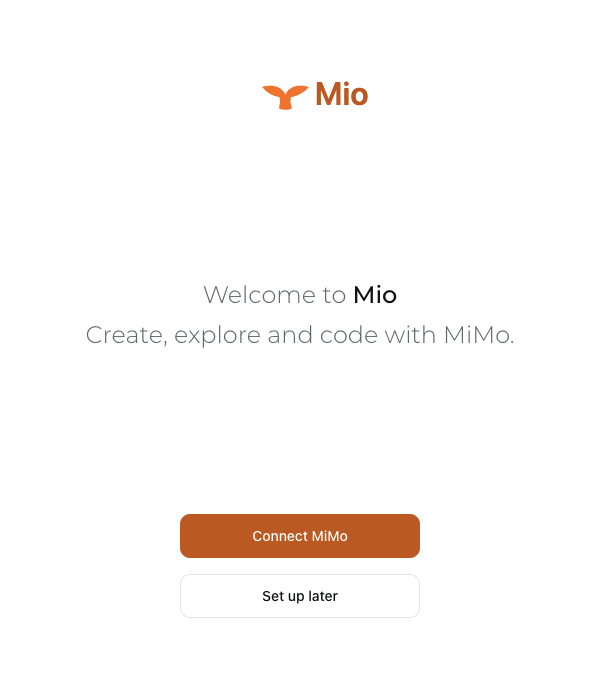
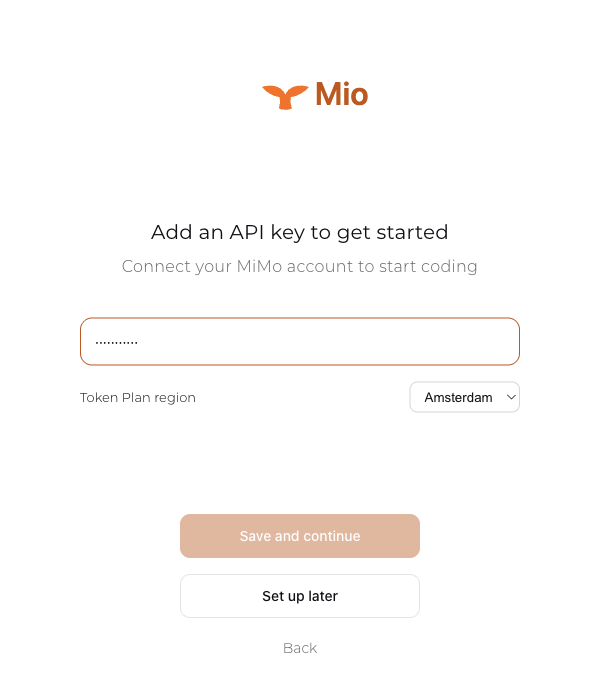
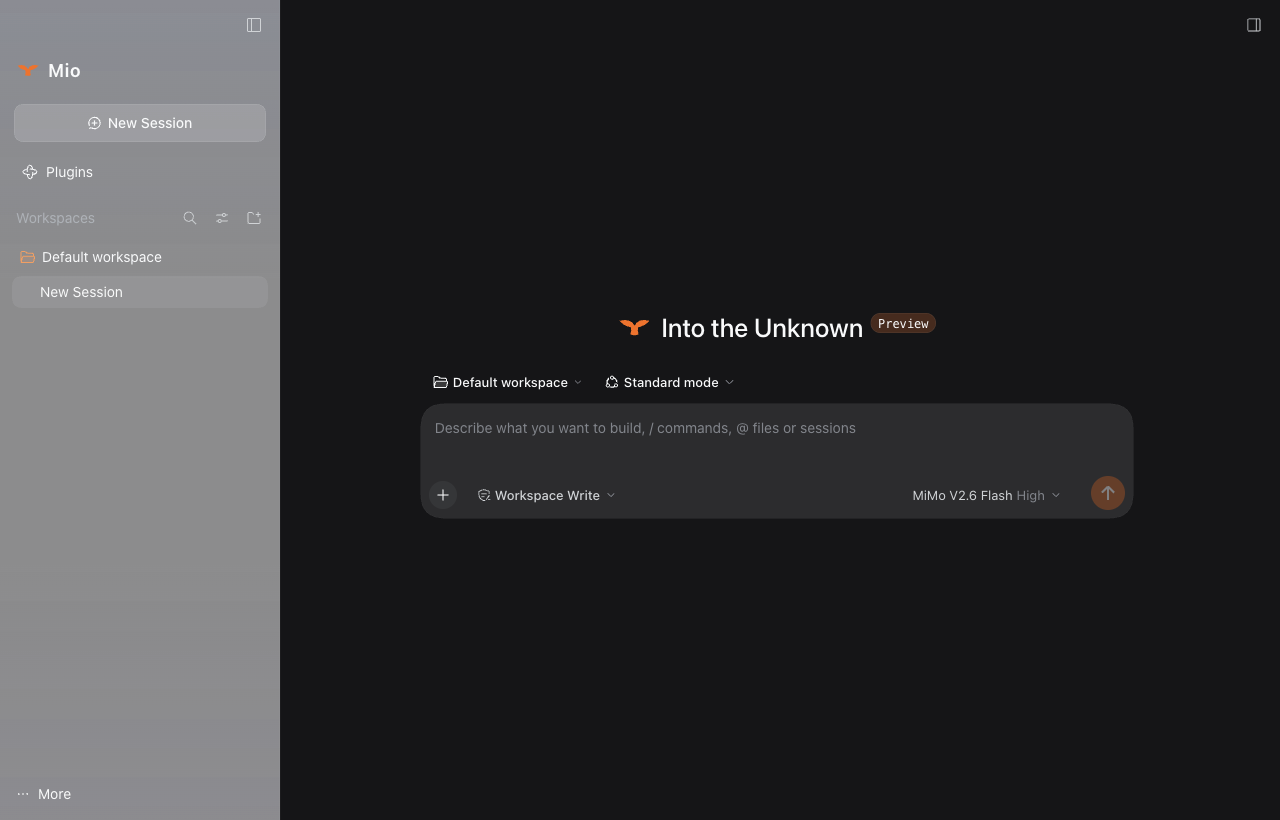
A walkthrough composed from real Mio 0.4.0 screens.
两副身躯,一个开关。
The everyday body: fast, economical, with thinking on by default.
For harder work: cross-file refactors and long debugging chains.
Flip it: one field changes in the request, and the whale swarm changes with it.
{
  "model": "mimo-v2.6-flash",
  "thinking": { "type": "enabled" },
  "max_completion_tokens": 32768
}
Try a prefix. This page reads it locally; nothing is stored or sent.
MIO = MIMO × Harness
What beats below is a whale. DeepSeek Harness makes models, tools and sessions plugins; Mio pins an upstream version, adds one reviewed layer, and configures MiMo through dsh's own provider. When upstream improves, Mio moves a version pin.
带一头鲸回水面。
SHA256SUMS.txt; mio-0.5.1-qualification.json records each installer's source commit and signing state.FAQ · English / 简体中文 → · llms.txt
Mio is a free, MIT-licensed native desktop coding agent for the MiMo model family, for macOS and Windows. Since 0.4.0 it is the official DeepSeek Harness Desktop — upstream's workspace, tools and settings — with Mio's identity and MiMo defaults layered on top.
Mio is for developers who want to use MiMo models in a desktop workspace to work on their own code projects.
Mio helps you understand an existing codebase, implement features and investigate and fix bugs through natural-language requests. Review generated changes before using them.
The hard parts of a desktop agent — the tool loop, session persistence, model routing, the workspace UI — already exist in dsh, and they are open source. Mio composes them instead of forking them: a pinned upstream source, a reviewed overlay, and MiMo configured through dsh's own provider. Upstream improvements arrive by moving a version pin.
No. DeepSeek Harness is DeepSeek's open-source agent harness (MIT). Mio is an independent project built on it and is not a DeepSeek product.
MiMo V2.6 Flash, the default for new sessions, and MiMo V2.6 Pro. Thinking switches on or off per session; Off and High map to MiMo's thinking switch, with no graded effort levels. UltraSpeed is an opt-in build flag for accounts that support it.
Yes, since 0.4.1. The mic in the composer transcribes your request with MiMo ASR into an editable draft, and the speaker button under each reply reads it with MiMo TTS in one of nine voices. Both use your MiMo account; recordings and reply text are sent to the MiMo API.
macOS on Apple Silicon and Intel, Developer ID signed and notarized, and Windows x64, unsigned. Linux will follow separately. There is no terminal (TUI) version planned.
From 0.4.x, the data directory is retained. Exit GUI and CLI and back it up before upgrading; automation is now built in, and explicitly disabled settings stay disabled. Old normal transcript display becomes detailed. To roll back, restore the old installer and the complete pre-upgrade backup. Data from 0.3.x is not imported.
No. Mio is an independent, community-maintained project. It is not affiliated with, sponsored by, or endorsed by Xiaomi Inc., and it connects to the MiMo model platform purely as a third-party client.
The app is free and MIT-licensed; you pay only for MiMo API usage. Download the installer, then paste a MiMo API key from platform.xiaomimimo.com on the welcome screen: sk- keys are pay-as-you-go, tp- keys are token plans and ask for a region. You can skip that step and add the key later from the Models page.
身在水面,心在深海。
↑ Resurface